

Step-by-Step: A Practical Glossary and Guide to Common AI Terms Every Legal Professional Should Know
AI vocabulary is quickly becoming table stakes for legal work. Whether you manage discovery, draft engagement letters, or run operations, the right terms help you evaluate vendors, reduce risk, and collaborate confidently with IT. This guide translates essential AI concepts into plain English with concrete, law‑firm examples. You’ll learn the minimum working vocabulary, how the pieces fit together in Microsoft 365 and common legal tech stacks, and how to apply the glossary in real workflows—from client onboarding to knowledge retrieval. Follow the steps to standardize language across attorneys, operations, and IT so you can make safer, faster, and more cost‑effective decisions.
Table of Contents
- Prerequisites / What You’ll Need
- Step 1: Align business scenarios and risk in your firm
- Step 2: Build a shared vocabulary for models and capabilities
- Step 3: Understand data, retrieval, and “memory”
- Step 4: Prompting, orchestration, and automation in Microsoft 365
- Step 5: Governance, security, and compliance for legal AI
- Step 6: Put it to work—your 90‑day rollout plan
- Troubleshooting: Roadblocks and solutions
- Success checklist
- Conclusion & next steps
Prerequisites / What You’ll Need
- Microsoft 365 with SharePoint/OneDrive and Teams; optional: Microsoft Power Automate and Microsoft Purview for governance.
- Access to your Document Management System (DMS) and knowledge repositories (precedents, playbooks, SOPs).
- Permission to trial AI features (e.g., Microsoft Copilot) in a non‑production tenant or pilot workspace.
- Named stakeholders: a Partner sponsor, an Operations/IT lead, and a Risk/Compliance contact.
- Sample documents you can safely use for testing (non-client or properly anonymized).
Step 1: Align business scenarios and risk in your firm
Before we define the tech, anchor it to revenue, client impact, or risk reduction. Use this step to choose use cases and create a shared risk lens.
Key terms to know
- Use Case: A clearly defined job AI will perform (e.g., “summarize opposition briefs,” “draft client onboarding emails”).
- ROI (Return on Investment): Value from time saved, improved accuracy, or reduced outside vendor spend.
- PII/PHI: Personally Identifiable Information / Protected Health Information; must be protected and masked when appropriate.
- Attorney–Client Privilege: Confidential communications safeguarded from disclosure; treat prompts and outputs as potentially privileged records.
- Data Residency / Sovereignty: Where your data is stored; may be required by client terms or regulations.
- Retention: How long data is kept; ensure prompts, chat logs, and generated drafts comply with policy.
- DPIA/PIA: Data Protection Impact Assessment / Privacy Impact Assessment; a structured risk assessment before deploying AI.
What to do
- Pick 3 quick‑win use cases: a) client onboarding email pack, b) discovery checklist assembly, c) policy/Q&A retrieval for associates.
- For each, document data sources, sensitivity (PII/privilege), and retention requirements.
- Draft a one‑page DPIA/PIA outline with risks (hallucination, leakage) and mitigations (review steps, access controls).
- Agree on a pilot scope, success metric (minutes saved per matter, response accuracy), and a human reviewer.
Note: Treat any prompt that includes client details as work product. Store prompts/outputs where matter security and retention rules apply.

Step 2: Build a shared vocabulary for models and capabilities
These are the foundational terms behind “AI that writes.” Use them to evaluate vendors, explain behavior, and tune performance expectations.
Core model concepts
- Artificial Intelligence (AI): Systems that perform tasks requiring human‑like perception, reasoning, or language.
- Machine Learning (ML): Methods where models learn patterns from data instead of explicit rules.
- Natural Language Processing (NLP): Techniques for understanding and generating human language.
- Generative AI: Models that create new text, images, or code based on learned patterns.
- Large Language Model (LLM): A generative model trained on vast text to predict the next token (piece of text).
- Foundation Model: A broad, pretrained model adaptable to many tasks (e.g., summarization, drafting).
- Parameters: The learned weights inside a model; more parameters can mean richer capability but not always better results.
- Token: A chunk of text (word or subword) used by models; limits define how much input/output fits at once.
- Context Window: Maximum tokens the model can consider in one request; affects how much evidence you can provide.
Control and behavior terms
- Prompt: The instruction or question you give the model.
- System Prompt: Hidden or fixed instruction that sets role and boundaries (e.g., “You are a legal assistant who cites sources.”).
- Zero‑Shot / Few‑Shot: Asking with no examples vs. including a few examples to guide style or structure.
- Temperature / Top‑p: Controls randomness and creativity; lower values increase consistency, which is preferred for legal drafting.
- Hallucination: Confident‑sounding but incorrect output; mitigated by retrieval and strict prompts.
- Fine‑Tuning: Additional training on your examples to adapt style or domain; useful when consistent style matters across many prompts.
- Adapters / LoRA: Lightweight fine‑tuning methods that are cheaper and faster than full retraining.
- Multimodal: Models that accept or produce multiple formats (text, images, audio, video).
- Guardrails: Rules and filters that block unsafe content, policy violations, or out‑of‑scope requests.
What to do
- Run a 30‑minute lunch‑and‑learn to align on definitions above. Capture them in a one‑page firm glossary.
- Choose default behavior controls (e.g., “temperature 0.2 for drafting, 0.0 for citations”).
- Create a style guide: tone, reading level, and must‑include elements (citations, disclaimers, conflicts language).
Step 3: Understand data, retrieval, and “memory”
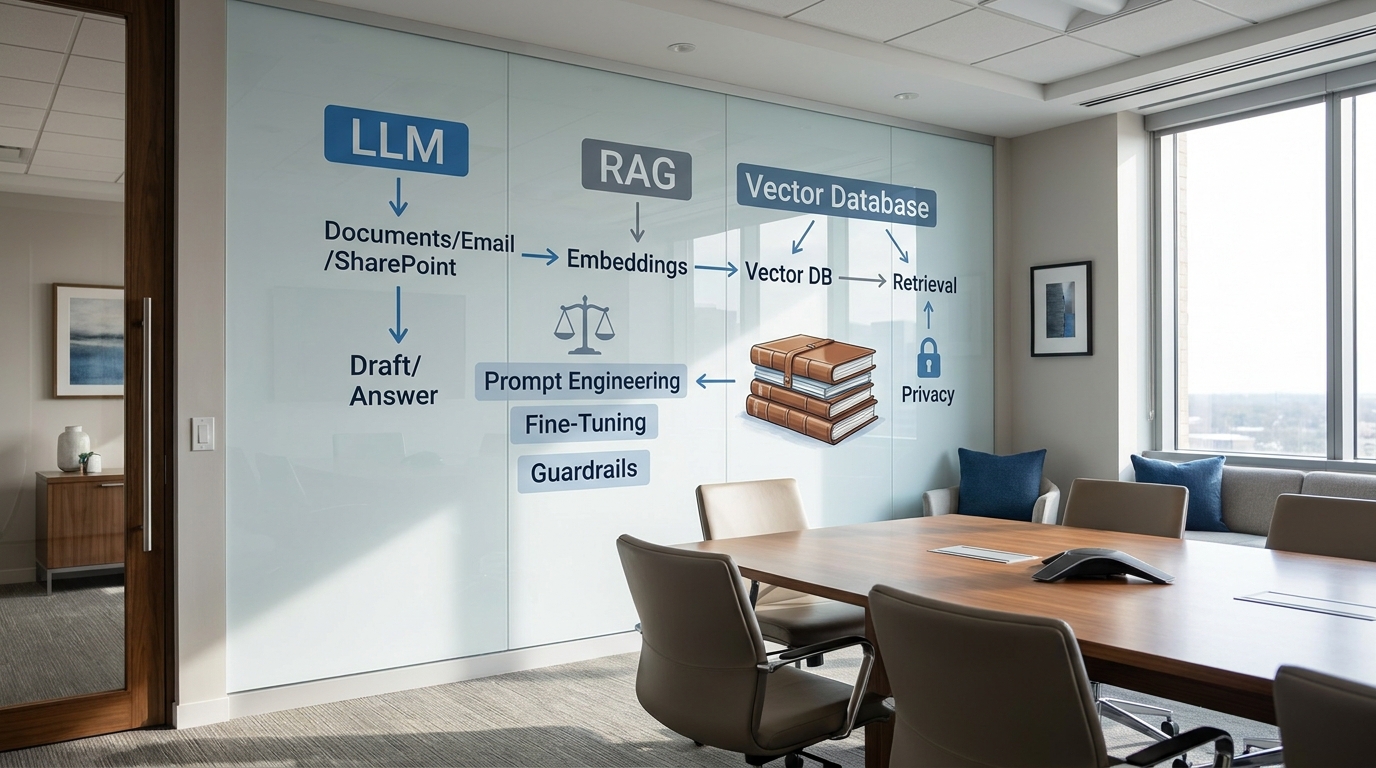
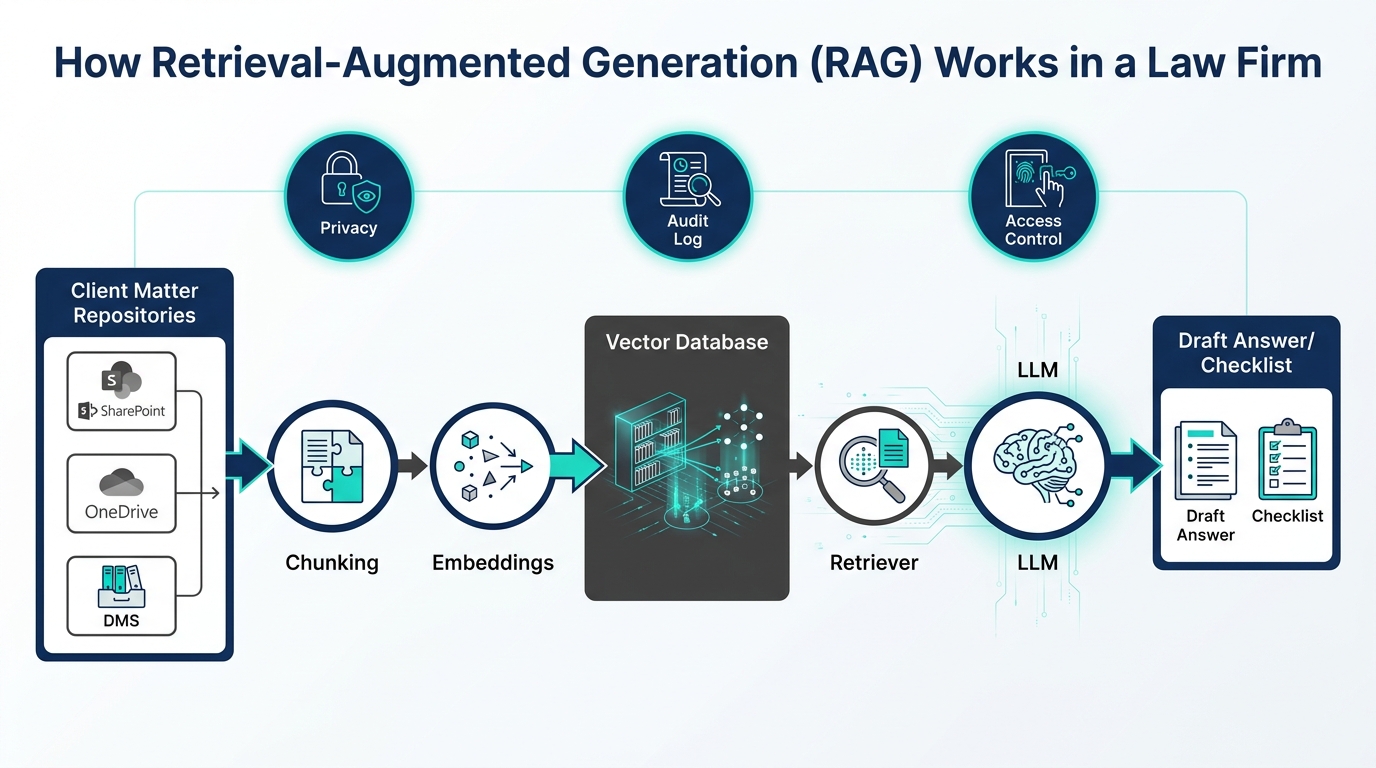
Generative models don’t “know” your firm’s documents unless you securely provide them at request time. Retrieval‑Augmented Generation (RAG) is how most firms safely ground answers in internal knowledge.
Data and retrieval terms
- Corpus: The set of documents you want AI to reference (policies, briefs, engagement letters, SOPs).
- Chunking: Splitting documents into smaller, semantically meaningful sections that fit the context window.
- Embeddings: Numerical vectors representing the meaning of text; similar meaning → similar vectors.
- Vector: An array of numbers the system uses to measure similarity between chunks.
- Vector Database: Specialized store that indexes embeddings and returns the most similar chunks.
- Similarity Search: Finding the closest vectors to a query; often uses cosine similarity or related metrics.
- Retriever: The component that fetches top‑k relevant chunks to feed the model.
- RAG (Retrieval‑Augmented Generation): Pattern: retrieve relevant chunks → insert into prompt → generate grounded answer.
- Grounding: Supplying authoritative source text so outputs can be verified and cited.
- Citations: Links/snippets pointing to the retrieved sources used to produce the answer.
- Metadata: Tags like matter number, author, date, and sensitivity labels to improve filtering.
- ACLs (Access Control Lists): Security rules ensuring users only retrieve documents they’re allowed to see.
- Indexing: The process of crawling, chunking, generating embeddings, and storing searchable vectors.
What to do
- Identify a small, low‑risk corpus (e.g., internal HR policies or public‑facing templates) to pilot RAG.
- Ensure SharePoint/OneDrive/DMS permissions are accurate; RAG must respect ACLs by default.
- Set chunk sizes (e.g., 500–1,000 tokens) and store matter metadata and sensitivity labels.
- Require citations in all answers and a confidence statement (“Based on Policies A, B, C, see links below”).
Pro‑Tip: Ask for “extractive” answers first. Example prompt: “Quote the exact provisions about remote work from our HR policy and provide the document link. Do not paraphrase.” Once you trust retrieval, allow concise paraphrase with citations.
Step 4: Prompting, orchestration, and automation in Microsoft 365
With vocabulary and retrieval basics in place, turn to prompts and workflow. In Microsoft 365, you can combine Copilot, SharePoint, and Power Automate to deliver repeatable outcomes.
Operational terms
- Prompt Engineering: Systematically designing instructions, examples, and constraints to get reliable outputs.
- Chain‑of‑Thought (Reasoning): Asking the model to reason stepwise. For client‑facing answers, prefer concise final reasoning with citations rather than exposing internal chains.
- Tools / Function Calling: Letting the model call external functions/APIs to look up data or perform actions (e.g., calendar availability).
- Agent / Orchestrator: A controller that selects tools, coordinates steps, and checks results against rules.
- Workflow Automation: Moving data between systems based on triggers (e.g., new engagement letter → draft welcome email).
- Connector / API: Secure integration to a system like your DMS or CRM.
- Evaluation Metrics: Measures like accuracy, citation coverage, and time saved per matter.
What to do
- Create a “Prompt Library” in SharePoint. Include fields for audience, objective, input checklist, constraints, and review steps.
- Standardize templates:
- Discovery checklist: “Using the attached complaint and our civil procedure checklist, list the 10 most likely document categories with custodians and date ranges. Cite sources.”
- Client onboarding email: “Draft a plain‑English welcome email for [Practice Area], include required conflict language, attach the engagement letter, and add a 3‑item next‑steps list.”
- Automate with Power Automate: Trigger when a new matter is created; assemble facts from CRM; use a function call to retrieve precedent paragraphs; generate a draft and route to a Partner for approval in Teams.
- Track evaluation metrics weekly: accuracy, average review time, and redlines required.
Pro‑Tip: Add “must‑not” rules to every prompt: “Do not fabricate citations; if uncertain, say ‘insufficient evidence’ and request the missing document.”
Step 5: Governance, security, and compliance for legal AI
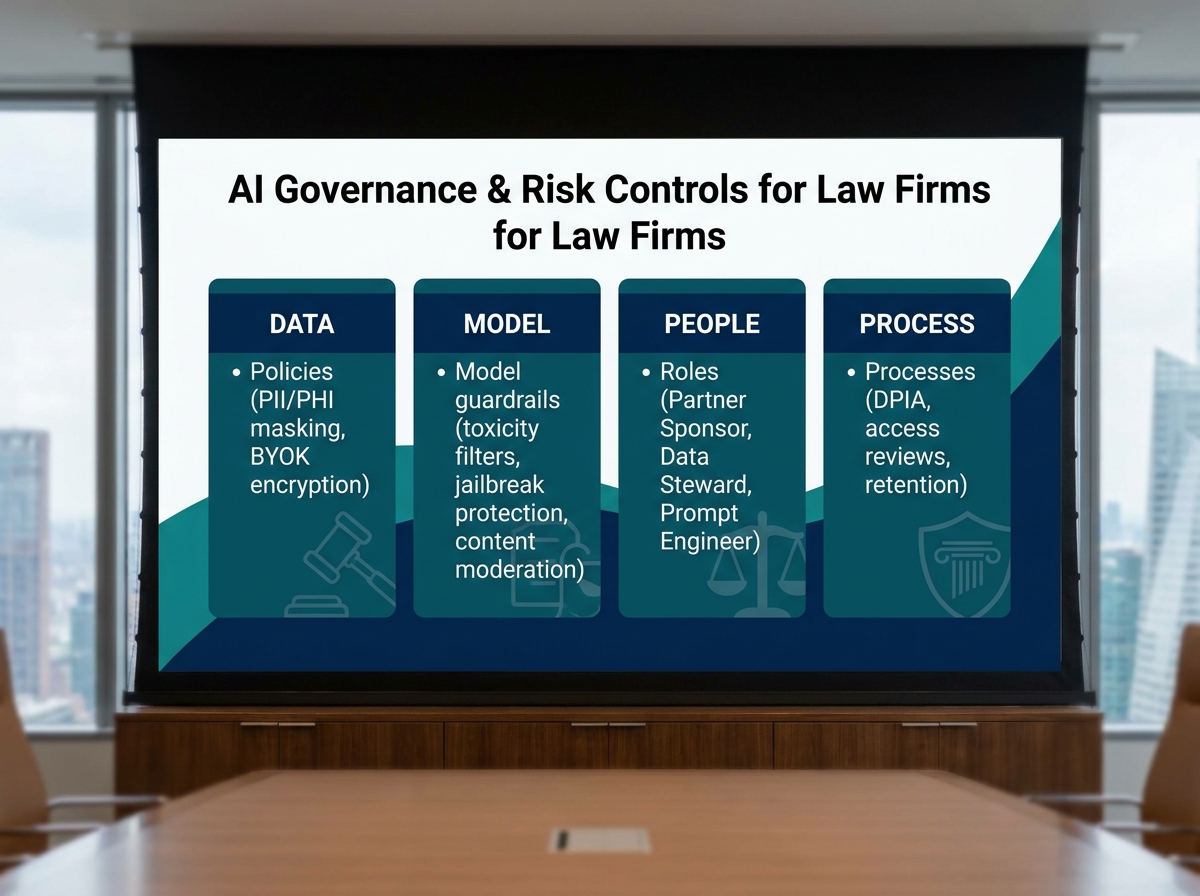
Strong governance protects clients and accelerates adoption. Put controls where they matter: data, models, people, and process.
Governance and security terms
- Data Classification: Labels (Public, Internal, Confidential, Highly Confidential) applied to prompts, sources, and outputs.
- Sensitivity Labels / DLP: Policies that prevent sharing or downloading sensitive content; enforce them on generated outputs, too.
- Encryption (at rest / in transit): Ensures data and prompts remain unreadable to unauthorized parties.
- BYOK / Customer‑Managed Keys: Bring‑your‑own‑key encryption for extra control.
- Tenant: Your firm’s isolated Microsoft 365 environment; apply controls at the tenant level.
- Conditional Access: Restrict AI features by user, device compliance, or location.
- Audit Logs and RBAC (Role‑Based Access Control): Track who did what; grant least‑privilege access to data and AI tools.
- Content Moderation / Safety Filters: Block toxic or disallowed content and prevent jailbreaks/prompt injection.
- Prompt Injection / Jailbreak: Attempts to override rules; mitigate with input validation and strict system prompts.
- Human‑in‑the‑Loop (HITL): Mandatory review before client delivery.
- Red‑Teaming: Actively testing the system for failures and unsafe behaviors.
- Watermarking / Provenance: Techniques to identify AI‑generated content in workflows.
- Model Card: A short document stating intended use, limits, and known risks of a model or solution.
What to do
- Enable sensitivity labels on your pilot libraries; require a label for any generated draft saved to SharePoint.
- Use conditional access to limit pilot features to a small group and managed devices.
- Log prompt/response metadata (no client secrets) for quality review; store logs in a secure workspace with retention.
- Publish an AI usage policy: approved tools; prohibited data; mandatory review; escalation path for suspected hallucinations.
- Conduct a red‑team test quarterly and revise guardrails accordingly.
Step 6: Put it to work—your 90‑day rollout plan
Turn the glossary into daily practice and measured outcomes.
Days 0–30: Foundation
- Finalize the glossary terms from Steps 2–5 and publish them in your intranet.
- Run a pilot on one use case (onboarding emails). Require citations where applicable and HITL review.
- Set baseline metrics: time to draft, number of revisions, error rate.
Days 31–60: Retrieval and evaluation
- Extend to a RAG use case (policy/Q&A for associates). Implement chunking, embeddings, and ACL‑respecting retrieval.
- Create evaluation prompts and a weekly review meeting to analyze outputs against your style guide.
- Document failure types (hallucination, missing citation, permission block) and add mitigations to prompts and guardrails.
Days 61–90: Orchestration and governance scale‑up
- Automate one end‑to‑end workflow (new matter → draft welcome email → checklist → task assignments in Planner/To Do).
- Expand governance: label outputs automatically, monitor DLP events, and rotate access keys.
- Publish a model card for your solution and present ROI to leadership.
Troubleshooting: Roadblocks and solutions
| Roadblock | Likely Cause | Solution |
|---|---|---|
| Copilot or assistant refuses to answer | Policy filter triggered or insufficient grounding context | Narrow the question; provide policy excerpts via RAG; lower temperature; verify content moderation settings. |
| Hallucinated case law or citations | Open‑ended prompt and no authoritative sources | Enforce extractive mode; require citations; include “If unsure, state insufficient evidence.” |
| Retrieval shows the wrong document | Poor chunking or weak embeddings; missing metadata | Reduce chunk size; add matter tags and dates; boost recency; experiment with top‑k and filters. |
| Users see documents they shouldn’t | ACLs not respected or indexing bypassed permissions | Rebuild index with security trimming; audit SharePoint/DMS permissions; restrict pilot to approved libraries. |
| Latency is too high | Large context window or heavy retrieval | Pre‑cache frequent chunks; compress context; standardize concise prompts; consider smaller models when appropriate. |
| Security review blocks rollout | Unclear data flows or retention plan | Create a DPIA/PIA; diagram data at rest/in transit; define retention for prompts/outputs; enable sensitivity labels. |
| Partners don’t trust outputs | Lack of citations and inconsistent tone | Require citations; implement a style guide; run weekly calibration with exemplars and redlines. |
Success checklist
- We agreed on three pilot use cases with metrics, reviewers, and guardrails.
- Our firm glossary defines LLM, embeddings, RAG, tokens, temperature, hallucination, guardrails, and citations.
- RAG pilot enforces ACLs, uses chunking/embeddings, and requires citations in answers.
- We maintain a SharePoint Prompt Library with input checklists and “must‑not” rules.
- Outputs are labeled with sensitivity and stored under matter‑appropriate retention.
- Audit logs and weekly evaluations track accuracy, time saved, and issues.
- We have a published AI usage policy and a point of contact for risk and support.
Conclusion & next steps
With a shared vocabulary and a stepwise approach, small and boutique firms can harness AI without compromising confidentiality or quality. You now know how models behave, how retrieval grounds answers in your own documents, and which governance controls de‑risk adoption. Start with one use case, insist on citations and HITL review, and expand via RAG and automation. As you scale, measure time saved per matter, redlines required, and user satisfaction. These fundamentals position your firm to evaluate vendors, negotiate better terms, and build repeatable, secure workflows in Microsoft 365 and your DMS.
Ready to explore how you can leverage technology and AI? Reach out to info@legalgpts.com today for expert guidance and tailored strategies.